All projectsPrototype · 01
Grafana Dashboard Agent
A personal prototype that builds Grafana dashboards from a sentence, inside Grafana: an app plugin in TypeScript and Go, and a Python agent that plans the panels, builds them with typed builders and checks that every saved panel returns data.
- Apr – Jul 2026
- Sole developer (personal project)
- 1
- AI agent
- TypeScript · React · Go · Python · FastAPI · LangGraph · Pydantic AI · MCP · OpenSearch
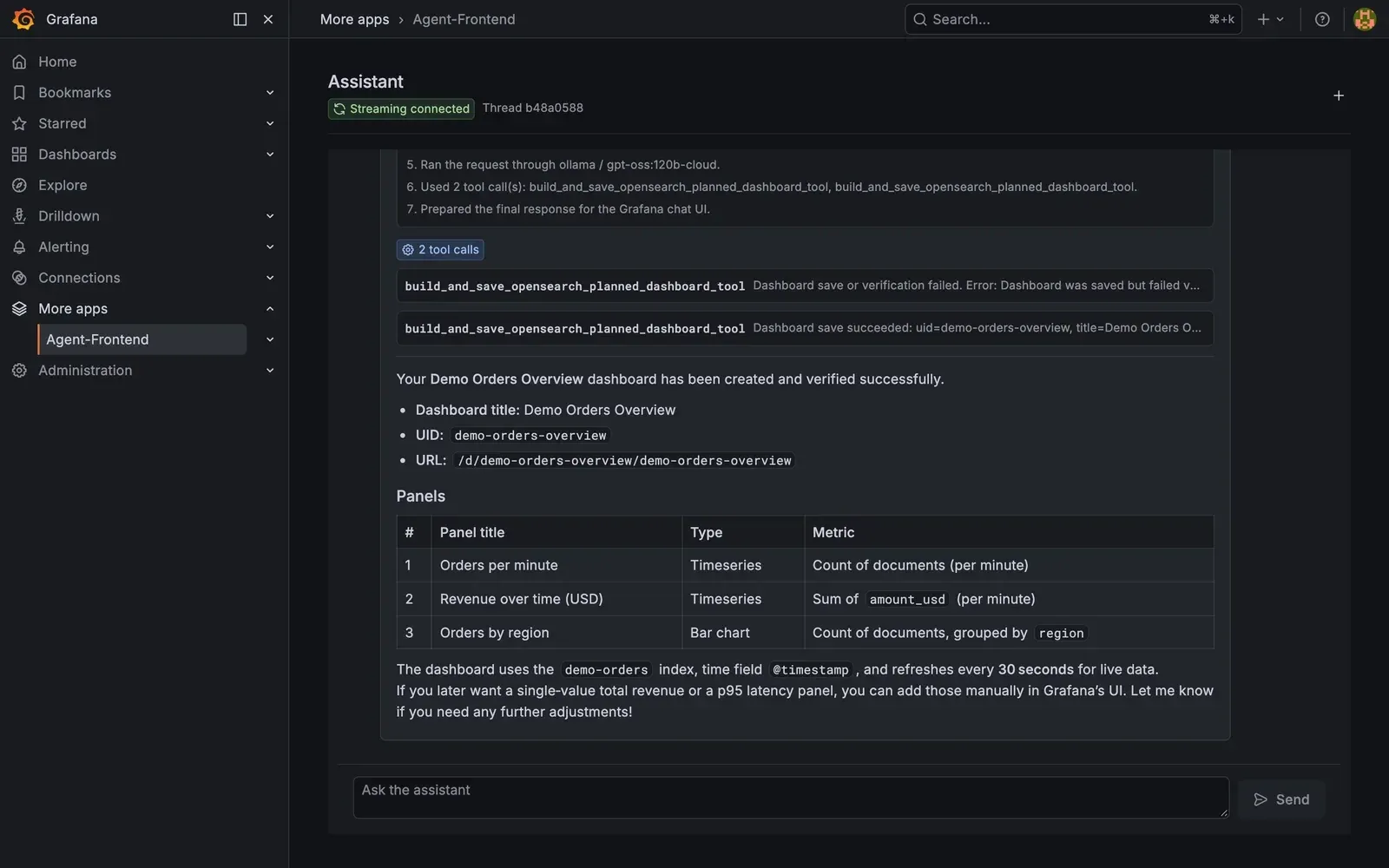
The Assistant page after a follow-up asking it to create the dashboard: the first save fails verification, the second saves three panels that return data. Synthetic data.
Problem & constraints
Building a Grafana dashboard means knowing the data source’s fields, its query language, the panel types and Grafana’s dashboard JSON. People who just want "orders per minute and a breakdown by region" have to learn all of that or ask someone who knows it.
An LLM can write dashboard JSON, but that JSON fails in quiet ways: a field name that doesn’t exist, an aggregation the data source rejects, panels that overlap. It saves fine and shows empty panels or errors later. The goal was an assistant inside Grafana that turns a request into a dashboard that actually queries data, and says so when it can’t.
Grafana users who know what they want to see but not the query and panel details.
- It had to live inside Grafana as an app plugin, not as a separate chat app.
- The agent’s API key must never reach the browser.
- Every connection (model provider, Grafana, OpenSearch) is configuration, not code.
My role
I built both halves and am the only contributor to the repository: the Grafana app plugin (React and TypeScript pages, a Go backend) and the Python agent service with its dashboard tools, verification and tests. It is a personal project, not built for an employer or on employer data.
Architecture
Two parts. The app plugin adds an Assistant page and a configuration page to Grafana. The agent is a FastAPI service that runs the model and edits dashboards.
flowchart TB
  subgraph Grafana
    UI["Assistant page (React, TypeScript)"] -->|REST| GO["Plugin backend (Go)"]
  end
  GO -->|"REST + API key"| API["Agent API (FastAPI)"]
  UI -->|"WebSocket: streamed tokens"| API
  API --> LG["LangGraph: prepare context, run agent, finalize"]
  LG --> PA["Pydantic AI agent"]
  PA -->|"MCP"| OS["OpenSearch MCP: indices, mappings"]
  PA -->|"planned-dashboard tools"| B["Grafana Foundation SDK builders"]
  B --> SV["Save, then run every panel query"]
  SV -->|"MCP and HTTP API"| GF["Grafana"]
  API --> PG["Postgres: thread history"]
PA --> M["Model provider: Ollama, OpenAI or Anthropic"]- The Go backend proxies the REST calls (chat, settings, health) and adds the agent’s API key server-side. The browser opens a WebSocket straight to the agent for low-latency token streaming.
- The agent is a LangGraph graph (prepare context → run agent → finalize) around a Pydantic AI agent. It discovers indices and field mappings through the OpenSearch MCP server and reads data sources and dashboards through the Grafana MCP server.
- The prompt tells the model to propose a plan (panel type, metric, field, bucket) and wait for confirmation. Deterministic tools then build the dashboard with the typed Grafana Foundation SDK builders. Model-written builder code, when it is used, runs in a subprocess with a 20-second timeout, and must print exactly one dashboard.
- After saving, the agent re-reads the dashboard and runs every panel’s query through Grafana’s query API. It repairs what it can, retries, and reports what still fails.
- Thread history lives in Postgres (Alembic migrations), and Logfire traces runs.
Diagram description
Flowchart: inside Grafana, the Assistant page (React and TypeScript) calls the plugin’s Go backend over REST, which forwards to the agent’s FastAPI API with the API key added. The page also opens a WebSocket straight to the agent API for streamed tokens. The API runs a LangGraph graph (prepare context, run agent, finalize) around a Pydantic AI agent. The agent reads indices and mappings through the OpenSearch MCP server and uses planned-dashboard tools that build with the Grafana Foundation SDK. Dashboards are saved and then every panel query is run against Grafana, through MCP and the HTTP API. The API stores thread history in Postgres, and the agent calls a model provider: Ollama, OpenAI or Anthropic.
Key decisions
Typed builders instead of model-written JSON
Raw dashboard JSON from a model is easy to get subtly wrong and hard to check.
- The model never writes dashboard JSON. It produces a plan, and tools build the dashboard with the Grafana Foundation SDK’s typed builders. Free-form builder code is a fallback, checked against a list of forbidden patterns and run in a subprocess with a timeout.
- Only what the builders and planned tools support can be built; everything else has to be added to the tools first.
Alternatives considered (2)
- Have the model emit dashboard JSON and save it through the Grafana MCP server — The JSON validates but often queries fields or aggregations that don’t exist, and the errors only show up when someone opens the dashboard.
- Fixed dashboard templates — Can’t follow a request for a specific metric, field or breakdown.
Verify after saving
A dashboard that saves is not a dashboard that works.
- After each save, fetch the dashboard back and run every data panel’s query through Grafana’s query API. Repair known problems and retry a bounded number of times; if panels still fail, report the error instead of claiming success.
- Slower saves, and the check only proves a panel returns data, not that it shows the right thing.
Alternatives considered (1)
- Trust schema-valid JSON — Schema validity says nothing about whether the data source accepts the query.
A native Grafana plugin with a server-side proxy
The assistant should sit where dashboards live, and the agent’s API key must stay off the client.
- A Grafana app plugin whose Go backend proxies REST calls and adds the key, while the browser streams tokens over a WebSocket straight from the agent.
- The agent must be reachable from the browser for the WebSocket, so its allowed origins and key need to be configured carefully.
Alternatives considered (2)
- A standalone chat app next to Grafana — Users would switch tools, and it would need its own login and Grafana access.
- Route streaming through the Go backend too — Adds a hop for every streamed token.
Outcomes & evidence
5 failed code builds, then 1 failed and 1 verified save (3 panels)
In a local run, the agent first skipped the plan and wrote builder code itself: five builds failed and it reported that nothing was saved. Asked again, it used the planned-dashboard tool; the first save failed verification, and the second saved three panels that returned data, saying p95 latency was left out.
One local run on 23 Sep 2026: Grafana 12.4.0 with the plugin built from the repository, OpenSearch 2.15 with 3,000 synthetic order events, model gpt-oss:120b-cloud through Ollama. Screenshots of each step are on this page. A single run, not an evaluation.
The agent’s 23 tests pass, once `pydantic-ai-slim` is held below 2.0.
`pytest agent/tests` on a fresh clone, 23 Sep 2026: 23 passed with pydantic-ai-slim 1.107.6. With the unpinned requirements, pydantic-ai-slim 2.x is installed and two test modules fail to import (`MCPServerStdio` was removed).
Source for this outcome (opens in a new tab)
Limitations & next steps
- Verification checks that each panel returns data, not that it is right: in the run above, both time-series panels were drawn as one series per timestamp.
- The model doesn’t always take the plan-first path: in the run above it went straight to free-form builder code and failed five times before a second request got it onto the planned tool.
- Only OpenSearch is supported as a data source for the planned-dashboard tools.
- The requirements are unpinned, and the current Pydantic AI release breaks the agent’s imports.
- No evaluation set: the outcome above is a single run on synthetic data.
- The plugin is unsigned, so Grafana must be told to allow it; it is a development build.
Next steps
- Pin dependencies, and add a CI job for the agent and plugin tests.
- Check panel shape as well as data (for example, one series per bucket, not per document).
- Build a small set of requests with expected panels and measure how often the saved dashboard matches.
Screenshots
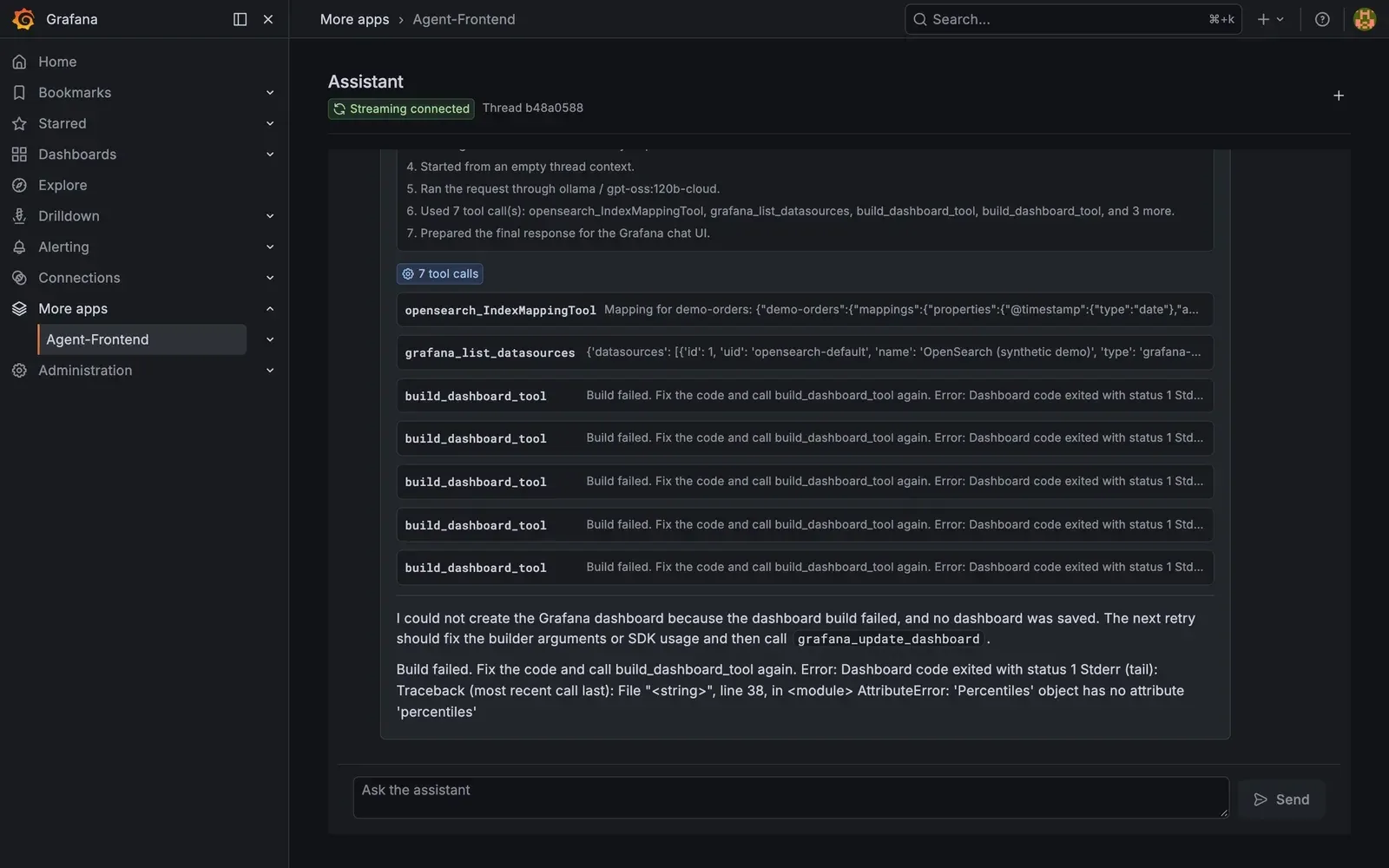
FIG. 02 The first attempt: the agent read the index mapping and data sources, then wrote builder code itself instead of proposing a plan. All five builds failed, and it said no dashboard was saved. Synthetic data.
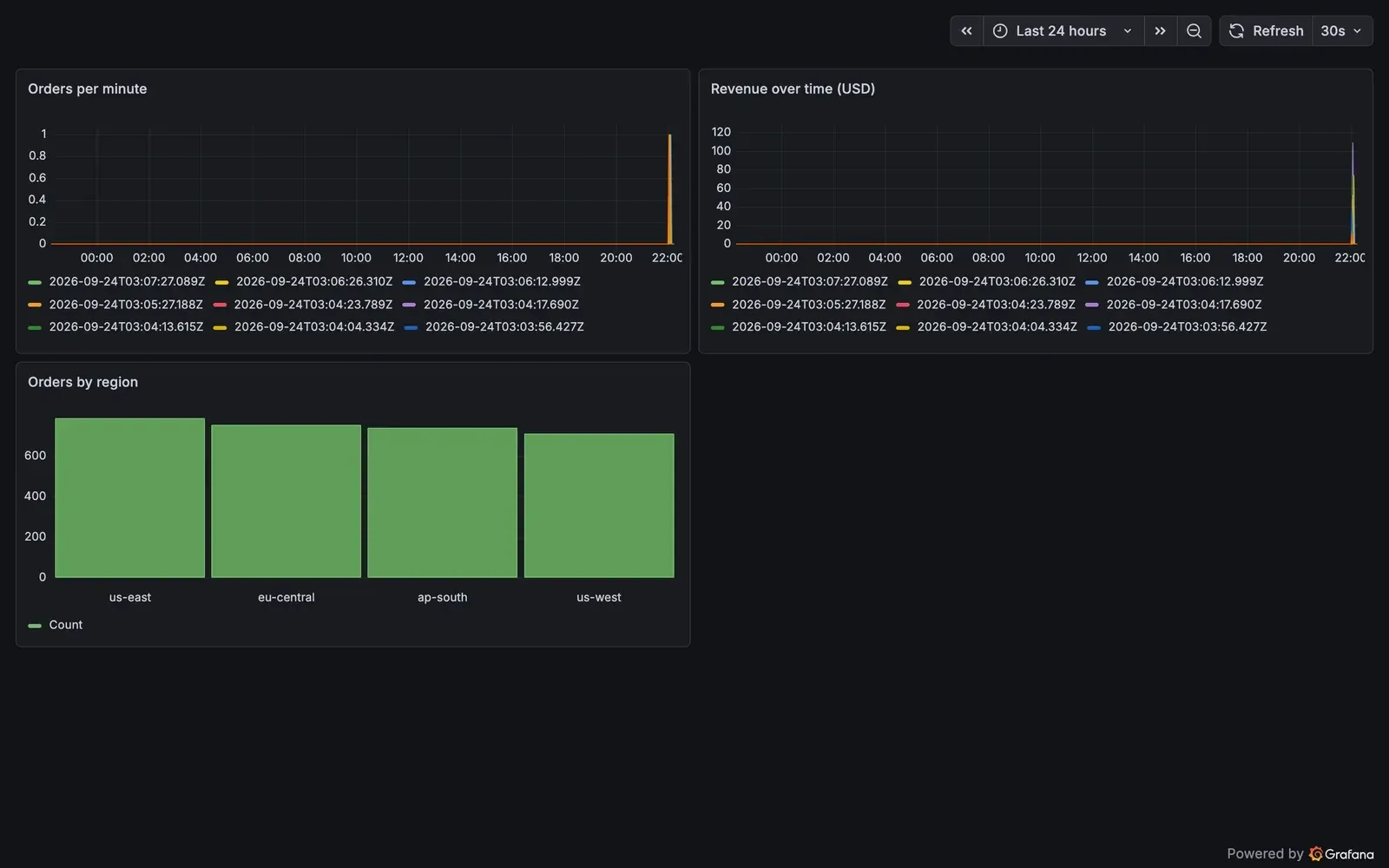
FIG. 03 The saved dashboard. The bar chart is right; the two time series pass the data check but are split into one series per timestamp, which is the limitation described above. Synthetic data.